SEMESTER START CHECKLIST
RECENT HIGH SCHOOL GRADUATES
An official high school transcript verifying your high school graduation must be on file before your first semester begins. If you have not done so already, please instruct your high school to mail or e-mail a final transcript to the Admissions Office ([email protected]) or upload document to Diploma, Transcript, HiSET, GED Submission site.
STUDENTS WITH TRANSFER CREDIT
If you have transfer credit to be reviewed and have not submitted an official college transcript yet, instruct the other institution’s Registrar’s Office to e-mail an official transcript for evaluation directly to this Registrar’s Office ([email protected]) .
REFER TO THE MULTI-FACTOR AUTHENTICATION (MFA) SET-UP GUIDE TO LOG IN TO INSIDERANKEN AND PROTECT YOUR RECORDS.
ACCESS YOUR EMAIL AT HTTPS://OUTLOOK.OFFICE.COM.
SIGN-UP FOR RANKEN’S NOTIFICATION SYSTEM.
VISIT PUBLIC SAFETY FOR PARKING PERMITS AND STUDENT ID.
REGISTRATION
All students are registered in all required courses from first semester to last semester upon admission or readmission. Click on the Academics tab on InsideRanken.org then scroll down to Notification – Current and Future Courses to view your registrations. Students who withdraw or fail a course must notify the Registrar’s Office to reschedule the repeat attempt.
REVIEW YOUR CLASS SCHEDULE
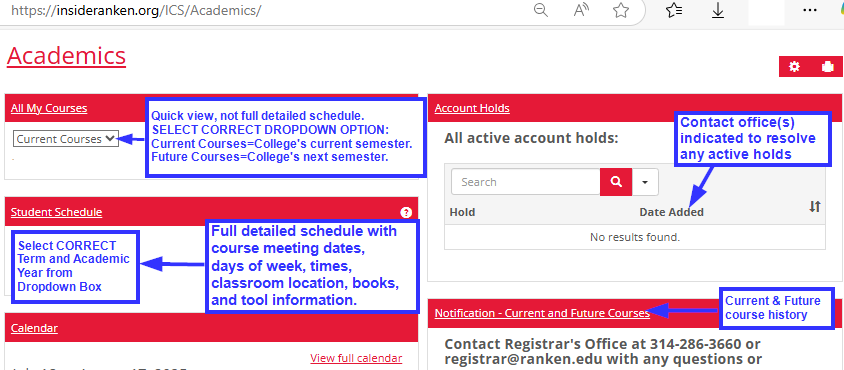
Click on the Academics tab on InsideRanken.org then scroll down to Student Schedule.
-
- Student Schedule section – select the correct academic year and semester to view your full detailed schedule with course meeting dates, days of week, times, classroom location, books, and tool information.
- All My Courses section – select the correct option from the dropdown. Current courses = College’s current semester. Future courses = College’s next semester. This quick view option does not provide the classroom location or books and tools information.
- Review the on-campus/in-person start dates, times, meeting days of the week, and classroom location of your technical/program classes.
- On-line general education classes are required for all daytime programs. Refer to the course syllabus for weekly assignments. The Sunday 12AM-6AM time is only a system placeholder, not the actual class meeting times. Click on the course and refer to the course syllabus for the assignments and their due dates. You must continue to log in each week, turn in your assignments and participate to be marked present for the week.
- Work Ethic Grade (WEG) courses required for daytime division programs only. Every semester you will have a Work Ethic Grade/Course associated with your major/technical class based on your attendance, appearance, attitude, honesty, etc. This course has no meeting times or dates. The Sunday 7AM time with the term start and end dates are only a placeholder for the system. Your technical course instructor will provide additional details. Refer to the Student Handbook for more details.
NEED TO MAKE A PROGRAM OR REGISTRATION CHANGE?
Contact the Registrar’s Office using this on-line form, by e-mail ([email protected]), phone #314-286-3660, or during office hours (St. Louis campus, Finney Bldg).
- Changes or withdrawals before the class begins incur no cost or grade assignment.
- Changes or withdrawals after the class begins are subject to the grade assignment and charges/refund policies detailed in the Student Handbook.
- Not attending classes is not an official withdrawal.
REVIEW THE ATTENDANCE POLICY IN THE STUDENT HANDBOOK.
Students are expected to attend all scheduled course sessions, arrive on time and remain for the duration of each course session. Students are responsible for monitoring their attendance record on Inside Ranken.
- Arriving after the scheduled start time or leaving before the scheduled end time will result in a tardy designation for attendance. A tardy is defined as a period of up to 10 minutes during the scheduled class time when a student is not present. Two tardies will count as one absence.
- Students are permitted a certain number of allowable absences to account for reasons such as illness, transportation issues, and tardies per course. Refer to your course syllabus and Student Handbook for further details.
- Students who exceed the allowable number of absences permitted in a course will be administratively withdrawn with a WF (Withdraw Failing) grade in the course.
VISIT THE BOOKSTORE FOR TEXTBOOKS, TOOLS, AND UNIFORMS.
- Uniform requirements per program are detailed in the Student Handbook.
- On-line courses have digital textbooks accessible through your course.
RESOLVE ANY HOLDS ON YOUR ACCOUNT WITH THE OFFICE(S) LISTED
View under Academics tab of InsideRanken. Students with holds who are Not Authorized cannot attend classes or purchase books and tools. Typical holds:
- Admissions Office: Missing HS/GED graduation verification.
- Business Office: Financial aid has not been finalized, payment has not been made, and/or payment plan has not been set-up (if needed).
FINANCIAL INFORMATION
Students are responsible for making a payment and setting up a payment plan for any tuition and fees not covered by financial aid, military benefits, or employer sponsorship before the semester begins. Allow enough time to complete your FAFSA and any other documents required by the Financial Aid Office if utilizing aid.
-
- File a FAFSA at fafsa.gov if you plan to use any financial aid.
- Verify completion of your financial aid file (FAFSA and all required documents submitted to Financial Aid Office) before payment deadline (if applicable). Direct questions regarding your file to the Financial Aid Office at 314-286-4878 or [email protected].
- Students planning to utilize military/VA benefits should visit https://www.va.gov/education/ to obtain your Certificate of Eligibility (COE) notice. Submit COE to Registrar’s Office via e-mail ([email protected]), mail, or in person.
- Submit payment and set-up payment for any remaining balance due by deadline (if applicable). Payments of the $95 Registration Fee or any past semester’s balance do not count as a payment toward next semester’s balance.
- Payment plans set-up by payment deadline provide the most options. Options are reduced after deadline.
-
- July 1st for Fall semesters
- December 1st for Spring semesters
- April 1st for Summer semesters.
-
- Payment submission and plan set-up instructions:
- Log in to your student account at InsideRanken.org.
- Click on the Finances tab to view your account.
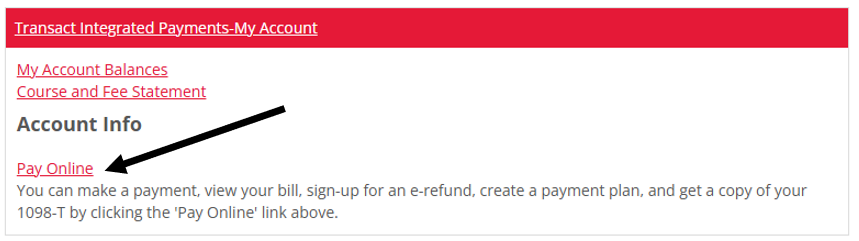
- Click on Pay Online.
- Click on Payment Plans and select a payment option.
- Click on Enroll in Plan to complete the set-up.
- Direct account questions to the Business Office at 314-286-4869, [email protected], or in person.